Monitoring IB Counters with Prometheus and Grafana
Introduction
In my previous post, I showed that InfiniBand delivers 27–57× higher multi-node throughput than Ethernet for LLM fine-tuning on Azure H100 clusters. But having fast interconnect is only half the story — you also need to know when it’s degrading. A single faulty IB port can silently cripple a multi-node training run, and without monitoring, the symptom looks like “training is slow” rather than “port 3 on node 7 has 50,000 packet sequence errors.”
This post describes a complete monitoring pipeline for InfiniBand health on Azure Standard_ND96isr_H100_v5 VMSS clusters: what counters exist, where they come from, how to export them to Azure Managed Prometheus, and how to visualize them in Grafana. The entire setup deploys automatically as part of VMSS provisioning — no manual SSH required.
What Gets Monitored
Each H100 node has 8× Mellanox ConnectX-7 InfiniBand HCAs (mlx5_ib0 through mlx5_ib7), plus one Accelerated Networking interface (mlx5_an0). The monitoring pipeline collects three categories of metrics from every node:
1. IB port counters — basic traffic and error counters from the standard InfiniBand management layer:
| Counter | Description |
|---|---|
ib_port_rcv_data |
Total bytes received |
ib_port_xmit_data |
Total bytes transmitted |
ib_port_rcv_errors |
Receive errors (malformed packets, ICRC errors, etc.) |
ib_port_xmit_discards |
Transmit discards (congestion, buffer overflow) |
ib_port_rcv_constraint_errors |
Packets discarded due to receive constraints |
ib_port_xmit_constraint_errors |
Packets discarded due to transmit constraints |
ib_port_physical_state |
Port physical link state (5 = LinkUp, 3 = Disabled, 2 = Polling) |
2. IB hardware counters — low-level counters from the Mellanox mlx5_ib kernel driver, exposed at /sys/class/infiniband/mlx5_ib*/ports/*/hw_counters/. These are the most diagnostic counters for RDMA health — they reveal retransmissions, sequence errors, and QP-level failures that the basic port counters miss entirely.
3. System metrics — CPU utilization, memory usage, network I/O from the node exporter.
The IB Hardware Counters: A Deep Dive
The hardware counters are the most valuable and least documented part of IB monitoring. They come from the kernel’s mlx5_ib driver — specifically the RDMA verbs layer — and are available on any system with Mellanox OFED or the in-kernel rdma-core drivers. They are not specific to Azure’s HPC image or any particular cloud provider.
There are 22 counters per IB port. The table below describes each one, categorized by type, based on NVIDIA’s official documentation:
Error Counters
These should be zero on a healthy cluster. Any non-zero value warrants investigation.
| Counter | Description |
|---|---|
duplicate_request |
Number of received duplicate request packets. A duplicate request is a request that had been previously executed. Increments when the responder receives a request with a PSN that has already been completed — typically caused by the requester retransmitting due to a lost ACK. |
implied_nak_seq_err |
Number of times the requester detected an ACK with a PSN larger than the expected PSN for an RDMA read or response. This means the responder skipped a sequence number, implying a NAK for the missing packet. |
local_ack_timeout_err |
Number of times a QP’s ACK timer expired for RC, XRC, or DCT QPs at the sender side. The requester sent a request and never received an ACK within the configured timeout. Common causes: remote node unresponsive, network congestion, or cable/switch faults. |
out_of_buffer |
Number of drops due to lack of Work Queue Entries (WQEs) for the associated QPs. The receive queue ran out of posted buffers before the incoming data arrived. Indicates the application isn’t posting receive WQEs fast enough. |
out_of_sequence |
Number of out-of-sequence packets received. The responder received a packet with an unexpected PSN — either a gap or a reordering. Can indicate switch-level load balancing issues or packet drops. |
packet_seq_err |
Number of received NAK sequence error packets. The responder replied with a NAK indicating a sequence error — the requester sent packets out of order from the responder’s perspective. |
req_cqe_error |
Number of times requester CQE (Completion Queue Entry) completed with error status. The send operation failed at the hardware level. |
req_cqe_flush_error |
Number of times requester CQE completed with flushed-in-error status. Occurs when the QP transitions to an error state and outstanding WQEs are flushed. |
req_remote_access_errors |
Number of times requester detected remote access errors. The remote side rejected an RDMA operation because the memory region was not registered or the access rights were wrong. |
req_remote_invalid_request |
Number of times requester detected remote invalid request errors. The remote side received a malformed or unsupported RDMA operation. |
req_rnr_retries_exceeded |
Number of times RNR (Receiver Not Ready) retry count was exceeded. The responder’s receive queue was empty, and after the configured number of retries, the requester gave up. |
req_transport_retries_exceeded |
Number of times transport retry count was exceeded. After multiple retransmission attempts (typically 7 by default), the requester gave up — the remote side is unreachable or the link is severely degraded. |
resp_cqe_error |
Number of times responder CQE completed with error status. |
resp_cqe_flush_error |
Number of times responder CQE completed with flushed-in-error status. |
resp_local_length_error |
Number of times responder detected local length errors. The incoming RDMA write or send data didn’t match the expected length of the posted receive WQE. |
resp_remote_access_errors |
Number of times responder detected remote access errors. |
rnr_nak_retry_err |
Number of received RNR NAK packets exceeding the retry limit. Related to req_rnr_retries_exceeded but counted from the NAK reception side. |
Informative Counters
These are operational metrics — non-zero values are normal and expected during RDMA traffic.
| Counter | Description |
|---|---|
lifespan |
Maximum period in milliseconds that defines the aging of counter reads. This is a configuration value, not a traffic counter. |
rx_atomic_requests |
Number of received RDMA atomic operation requests (Compare-and-Swap, Fetch-and-Add). |
rx_dct_connect |
Number of received DCT (Dynamically Connected Transport) connection requests. |
rx_read_requests |
Number of received RDMA Read requests. Each RDMA Read causes the responder to fetch data from local memory and send it back. |
rx_write_requests |
Number of received RDMA Write requests. Each RDMA Write deposits data directly into the responder’s registered memory. |
Which Counters Matter Most for NCCL/FSDP
For distributed training workloads, the counters to watch are:
local_ack_timeout_errandreq_transport_retries_exceeded: These indicate a remote node or port is unreachable or severely degraded. Even a handful of transport retries can cause multi-second stalls in NCCL collectives.packet_seq_errandout_of_sequence: Sequence errors mean packets are being dropped or reordered in the switch fabric. This forces retransmissions and degrades effective bandwidth.out_of_buffer: If NCCL’s receive queues are exhausted, incoming RDMA writes stall. This can happen under extreme memory pressure or with misconfigured QP parameters.req_cqe_error/resp_cqe_error: Hardware-level completion errors. If these appear, the IB HCA or its firmware may need attention.
The informative counters (rx_read_requests, rx_write_requests, rx_atomic_requests) are useful for confirming that RDMA traffic is actually flowing during a training run. During an NCCL all-reduce, you should see rx_write_requests climbing steadily on all ports.
Architecture
The monitoring pipeline has four layers:
┌──────────────────────────────────────────────────────────┐
│                   Azure Managed Grafana                  │
│               (Dashboard with PromQL queries)            │
└────────────────────────┬─────────────────────────────────┘
                         │ PromQL queries
┌────────────────────────▼─────────────────────────────────┐
│              Azure Monitor Workspace (AMW)                │
│           (Managed Prometheus / remote_write)             │
└────────────────────────┬─────────────────────────────────┘
                         │ remote_write (HTTPS)
┌────────────────────────▼─────────────────────────────────┐
│              Prometheus (per-node container)              │
│           (Moneo's start_moneo_services.sh)              │
│                                                          │
│   Scrape jobs:                                           │
│     :8001 → net_exporter    (IB port counters)           │
│     :8002 → node_exporter   (CPU, memory, network)       │
│     :8003 → ib_hw_exporter  (IB hw_counters - custom)    │
└────────────────────────┬─────────────────────────────────┘
                         │ HTTP scrape
┌────────────────────────▼─────────────────────────────────┐
│                  Linux kernel (sysfs)                     │
│   /sys/class/infiniband/mlx5_ib*/ports/*/counters/*      │
│   /sys/class/infiniband/mlx5_ib*/ports/*/hw_counters/*   │
│   /proc/stat, /proc/meminfo, /sys/class/net/...          │
└──────────────────────────────────────────────────────────┘
Moneo: What It Provides (and What It Doesn’t)
Moneo is pre-installed on Azure’s HPC Ubuntu images at /opt/azurehpc/tools/Moneo/. When started via start_moneo_services.sh, it runs a Prometheus container that scrapes three local exporters and remote_writes to Azure Monitor:
- net_exporter (
:8001): IB port counters —ib_port_rcv_data,ib_port_xmit_data,ib_port_rcv_errors,ib_port_physical_state, etc. - node_exporter (
:8002): System metrics —node_cpu_util,node_mem_util,node_mem_available,node_cpu_frequency,node_net_rx,node_net_tx. - nvidia_exporter (
:8000): GPU metrics via DCGM. (Note: this was broken in our testing due to adcgm_fieldsmodule error — not critical for IB monitoring.)
What Moneo does not export is the IB hardware counters — the 22 counters from /sys/class/infiniband/mlx5_ib*/ports/*/hw_counters/. These are the most diagnostic counters for RDMA health, and their absence is a significant gap. To fill it, I wrote a custom exporter.
The Custom IB Hardware Counter Exporter
The ib_hw_exporter.py is a minimal Python HTTP server that reads all 22 hardware counters from sysfs and serves them in Prometheus exposition format on port 8003:
#!/usr/bin/env python3
"""Prometheus exporter for InfiniBand hw_counters.
Reads /sys/class/infiniband/mlx5_ib*/ports/*/hw_counters/*
and serves as Prometheus gauge metrics on port 8003.
"""
import glob, http.server, socket

PORT = 8003
HOSTNAME = socket.gethostname().lower()
HW_COUNTERS_GLOB = "/sys/class/infiniband/mlx5_ib*/ports/*/hw_counters/*"

def collect_metrics():
    lines = []
    seen = set()
    for path in sorted(glob.glob(HW_COUNTERS_GLOB)):
        parts = path.split("/")
        device, port_num, counter = parts[4], parts[6], parts[8]
        try:
            with open(path) as f:
                val = f.read().strip()
            float(val)
        except (IOError, ValueError):
            continue
        metric = f"ib_hw_{counter}"
        ib_port = f"{device}:{port_num}"
        if metric not in seen:
            lines.append(f"# HELP {metric} IB hw_counter {counter}")
            lines.append(f"# TYPE {metric} gauge")
            seen.add(metric)
        lines.append(f'{metric}{{instance="{HOSTNAME}",ib_port="{ib_port}"}} {val}')
    return "\n".join(lines) + "\n"
This runs as a host-level process (not containerized) and is automatically added to Prometheus’s scrape configuration as the custom_exporter job. The label format — instance (hostname) and ib_port (e.g., mlx5_ib0:1) — matches Moneo’s existing exporters, so all metrics can share the same Grafana template variables.
One important detail: we filter mlx5_an0 (the Accelerated Networking interface for Ethernet) out of the ib_port dropdown in Grafana using ib_port=~"mlx5_ib.*". This keeps the dashboard focused on the 8 real InfiniBand HCAs.
Deployment
The entire stack — VMSS, monitoring, and the custom exporter — deploys from a single bash deploy.sh command. The key steps:
1. Provision the Monitoring Backend
prometheus_grafana.sh creates three Azure resources:
- User-Assigned Managed Identity (MI) — authenticates Prometheus to Azure Monitor
- Azure Monitor Workspace (AMW) — the managed Prometheus backend
- Azure Managed Grafana — for dashboards
It then assigns the Monitoring Metrics Publisher role to the MI on three scopes:
# The AMW itself
az role assignment create --role "Monitoring Metrics Publisher" --scope $AMW_ID ...

# The Data Collection Rule (DCR) in the managed resource group
az role assignment create --role "Monitoring Metrics Publisher" --scope $DCR_ID ...

# The Data Collection Endpoint (DCE) in the managed resource group
az role assignment create --role "Monitoring Metrics Publisher" --scope $DCE_ID ...
The RBAC gotcha: Assigning the role on the AMW alone is not sufficient. Prometheus’s
remote_writetargets the DCR/DCE in a system-managed resource group (MA_{amw_name}_{location}_managed), and without the role on those resources, every write returns HTTP 403 Forbidden. The AMW documentation doesn’t mention this. The managed resource group and its DCR take 30–60 seconds to appear after AMW creation, so the script includes a polling loop.
2. Configure Moneo via cloud-init
The VMSS cloud-init template configures Moneo’s moneo_config.json with the MI client ID and the Prometheus remote_write endpoint, then starts the Moneo services:
# Substitute placeholders in moneo_config.json
sed -i "s|<identity client id>|${client_ID}|g" /opt/azurehpc/tools/Moneo/moneo_config.json
sed -i "s|<metrics ingestion endpoint>|${endpoint}|g" /opt/azurehpc/tools/Moneo/moneo_config.json

# Start Prometheus + all exporters
/opt/azurehpc/tools/Moneo/linux_service/start_moneo_services.sh
3. Deploy the Custom Exporter
After the VMSS is up, deploy.sh SCPs ib_hw_exporter.py to the head node, then distributes and starts it on every node via a helper script:
# Head node: SCP the exporter
scp ib_hw_exporter.py head_node:/home/azureuser/

# start_exporters.sh runs on the head node, loops over hostfile
start_exporter() {
  local node=$1
  scp -o StrictHostKeyChecking=no /home/azureuser/ib_hw_exporter.py ${node}:/opt/ib_hw_exporter.py
  ssh -o StrictHostKeyChecking=no ${node} '
    pkill -f ib_hw_exporter.py 2>/dev/null || true; sleep 1
    setsid python3 /opt/ib_hw_exporter.py > /var/log/ib_hw_exporter.log 2>&1 &
  '
}
while read -r node; do start_exporter "$node"; done < hostfile
Why
setsidinstead ofnohup? When backgrounding a process over SSH (ssh host 'nohup cmd &'), the process may still be killed when the SSH session exits —nohuponly ignores SIGHUP but doesn’t detach from the session leader.setsidcreates a new session, fully detaching the process. Also,sudois unnecessary since the sysfs hw_counters are world-readable.
Prometheus on each node already has a custom_exporter job configured in its scrape config, targeting localhost:8003. Once the exporter starts, metrics begin flowing within one scrape interval (15 seconds).
The Grafana Dashboard
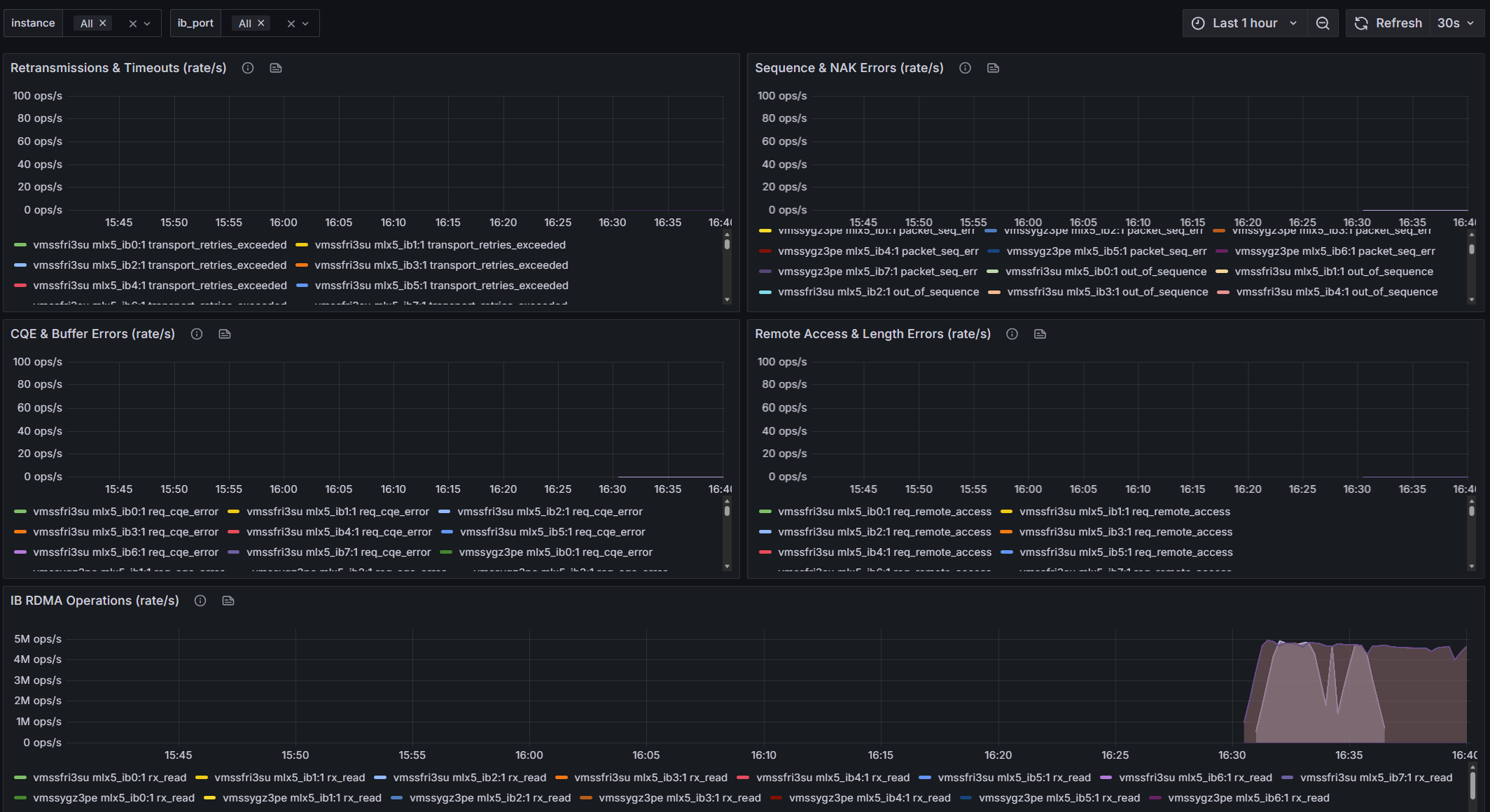
The pre-imported dashboard has 17 panels organized in five sections:
IB Port Health — Overview table of non-zero port errors (empty = healthy), RX/TX data rates, RX/TX error rates, and port physical state indicators.
IB Hardware Counters — Overview table of non-zero hw_counters (the most important panel — if it has rows, something is wrong), retransmission and timeout rates, sequence and NAK error rates, CQE and buffer error rates, remote access error rates, and RDMA operation rates.
System Metrics — CPU utilization, memory utilization, memory available, CPU frequency, and Ethernet network RX/TX rates.
Template variables allow filtering by instance (hostname) and ib_port (individual HCA). The ib_port variable filters out mlx5_an0 so only the 8 IB ports appear.
Interpreting the Dashboard
Healthy Cluster
On a healthy cluster, you should see:
- IB Port Errors overview table: Empty (no rows). All port error counters are zero.
- IB HW Counters overview table: Empty. All error counters are zero.
- IB RX/TX data rates: Flat near zero during idle, spiking uniformly across all ports during training.
- IB Port Physical State: All ports showing “LinkUp” (value 5).
- RDMA Operations:
rx_write_requestsandrx_read_requestsclimbing during NCCL collectives.
Warning Signs
| Symptom | Likely Cause | Action |
|---|---|---|
local_ack_timeout_err climbing on one port |
Cable fault, switch port issue, or remote node hung | Check cable, run ibdiagnet, contact Azure support for hardware |
packet_seq_err or out_of_sequence on multiple ports |
Switch-level congestion or adaptive routing reordering | Check switch health, verify topology |
out_of_buffer |
Application not posting enough receive WQEs; memory pressure | Profile NCCL buffer allocation, check for OOM events |
req_transport_retries_exceeded > 0 |
Remote port unreachable after all retries | Port or node is dead — check physical state, run NHC |
| One port’s RX/TX rate significantly lower than others | Degraded link speed, cable issue | ibstat on the node, check link speed/width |
| Physical state != 5 (LinkUp) | Port down or negotiating | Restart the IB interface, check cable and switch |
The Source of IB Counters
A common question: do these counters require the Azure HPC image? The answer is no.
The IB port counters (/sys/class/infiniband/*/ports/*/counters/) come from the InfiniBand management layer, which is part of the standard kernel RDMA subsystem. Any machine with rdma-core and a Mellanox HCA will have them.
The IB hardware counters (/sys/class/infiniband/*/ports/*/hw_counters/) come from the mlx5_ib kernel driver — the Mellanox-specific RDMA driver. They require either Mellanox OFED or the in-kernel mlx5 drivers (included in modern Linux kernels). These counters are not cloud-specific or image-specific — they work the same on bare-metal, AWS, GCP, or Azure. The only requirement is a Mellanox ConnectX HCA and the mlx5_ib driver.
What is specific to Azure’s HPC image is Moneo — the pre-installed monitoring framework that configures the Prometheus exporters and container. If you’re using a custom image, you’d need to install Moneo or set up equivalent exporters yourself.
This is a personal blog. Opinions and recommendations are my own, not Microsoft’s.
Leave a Comment