Understanding KV Cache in LLM Inference
Hands-on experiments on an NVIDIA H100 GPU reveal why KV cache — not model weights — dominates GPU memory during inference serving.
Introduction
When you ask ChatGPT a question, what’s actually eating GPU memory on the server? Most people guess “the model weights,” and they’re partially right — a 7B parameter model in FP16 takes about 14 GB. But there’s a hidden consumer that can dwarf the weights entirely: the KV cache.
The KV (Key-Value) cache stores the intermediate attention states for every token in the conversation. It’s what allows the model to “remember” what came before without recomputing everything from scratch. And as context windows grow to 128K+ tokens and servers handle dozens of concurrent users, the KV cache becomes the dominant bottleneck.
I ran a series of experiments on an NVIDIA H100 80GB HBM3 GPU using Qwen2.5-7B to measure exactly how much memory the KV cache consumes, how it scales, and why techniques like Grouped Query Attention (GQA) exist.
Setup
- GPU: NVIDIA H100 80GB HBM3 (Azure ND H100 v5 VMSS)
- Model: Qwen2.5-7B in FP16 (14.2 GB weights)
- Container:
nvcr.io/nvidia/pytorch:24.12-py3 - Framework: HuggingFace Transformers 4.47.1
How Big is the KV Cache? (The Formula)
For each token in the sequence, the model stores a Key vector and a Value vector at every layer, for every KV head. The size is:
KV cache per token = 2 × n_layers × n_kv_heads × d_head × dtype_bytes
For Qwen2.5-7B (28 layers, 4 KV heads, 128 head dimension, FP16):
2 × 28 × 4 × 128 × 2 = 57,344 bytes/token ≈ 56 KB/token
Every single token costs 56 KB of GPU memory. At 128K context length, that’s 7 GB per request — half the model weight for just one user’s conversation history.
Experiment 1: KV Cache Scales Linearly with Sequence Length
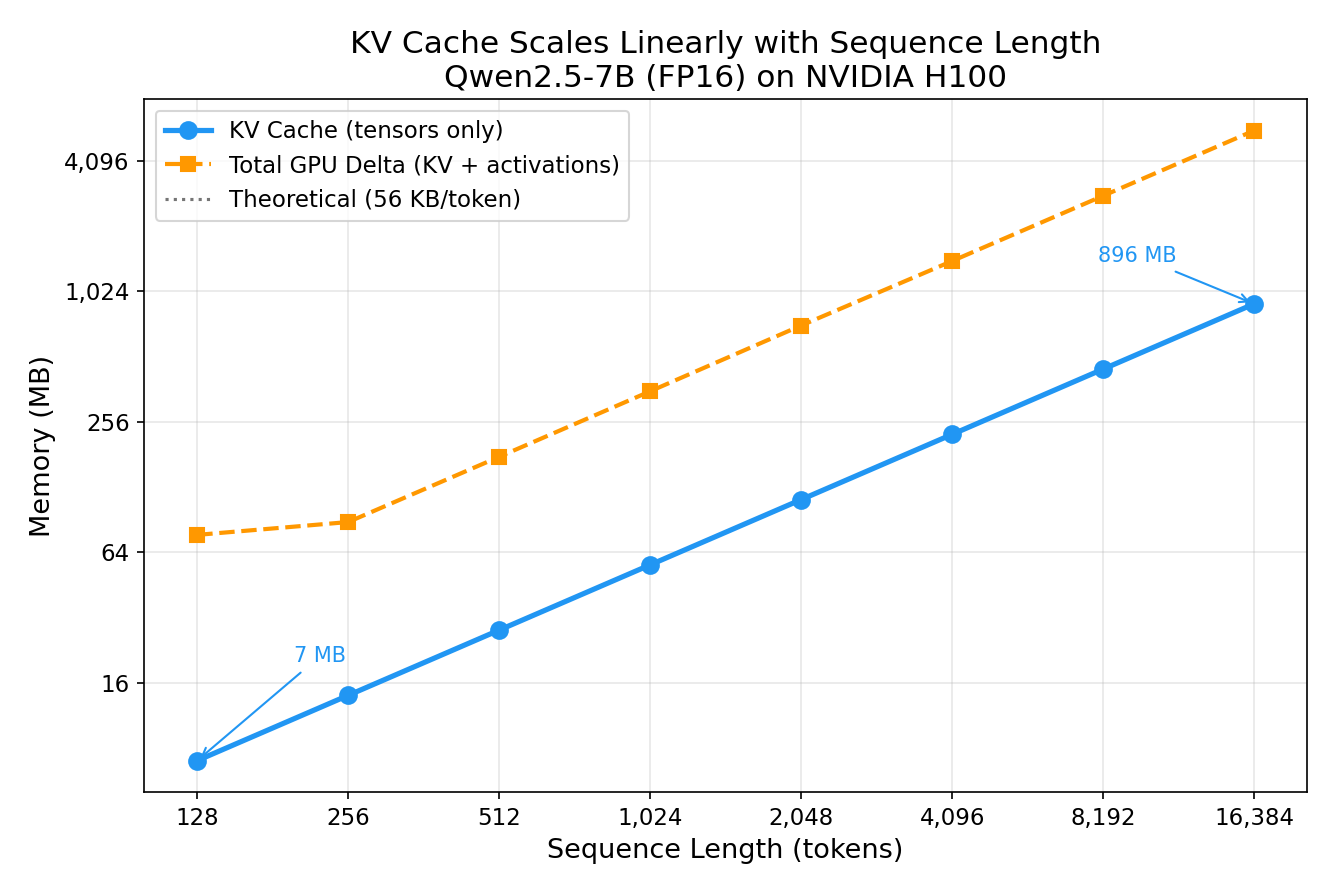
I fed the model sequences of increasing length and measured the KV cache tensors.
| Sequence Length | KV Cache | Theory Match |
|---|---|---|
| 128 | 7 MB | ✅ |
| 1,024 | 56 MB | ✅ |
| 4,096 | 224 MB | ✅ |
| 16,384 | 896 MB | ✅ |
Every data point lands exactly on the theoretical prediction — 57,344 bytes/token, no exceptions. The relationship is perfectly linear: 128x the sequence length = 128x the KV cache.
Notice the “GPU Delta” line is higher than the KV tensors themselves — that’s because the attention computation also allocates temporary activation memory that scales quadratically with sequence length (the attention score matrix is seq_len × seq_len). But the persistent KV cache is the memory that stays allocated between tokens.
Experiment 2: KV Cache Scales Linearly with Batch Size
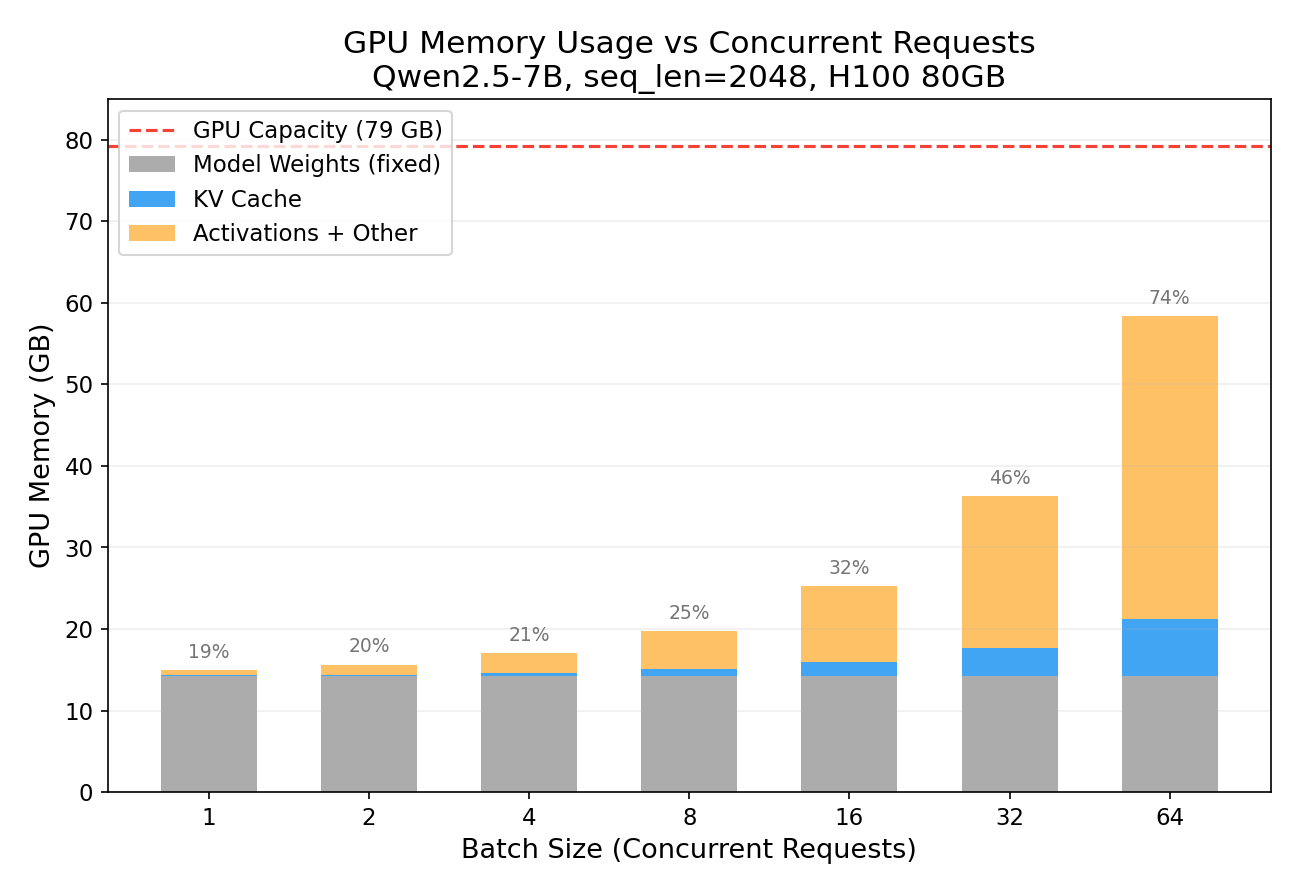
What happens when you serve multiple users simultaneously? Each user gets their own KV cache.
| Concurrent Users | KV Cache | Total GPU | % of H100 |
|---|---|---|---|
| 1 | 0.11 GB | 14.95 GB | 19% |
| 8 | 0.88 GB | 19.77 GB | 25% |
| 32 | 3.50 GB | 36.32 GB | 46% |
| 64 | 7.00 GB | 58.38 GB | 74% |
At batch_size=64 with 2K context, we’re using 74% of the H100. The model weights (grey bar) stay constant — it’s the KV cache (blue) that grows with each additional user. This is why serving throughput is fundamentally memory-bound, not compute-bound.
You’ll notice the orange “Activations + Other” segment grows even faster than the KV cache. This is because the attention computation allocates temporary buffers for the attention score matrix, which has shape (batch_size, num_heads, seq_len, seq_len). At batch=64 with seq_len=2048, that’s 64 × 28 × 2048 × 2048 × 2 bytes ≈ 29 GB of transient memory just for the attention scores. These buffers are allocated during the forward pass and freed afterwards, but they contribute to the peak “GPU Delta” measurement shown here. In a production inference engine with FlashAttention, these quadratic attention buffers are eliminated — the attention is computed tile-by-tile without materializing the full score matrix — making KV cache the true dominant memory consumer.
Experiment 3: The Capacity Table Every Inference Engineer Needs
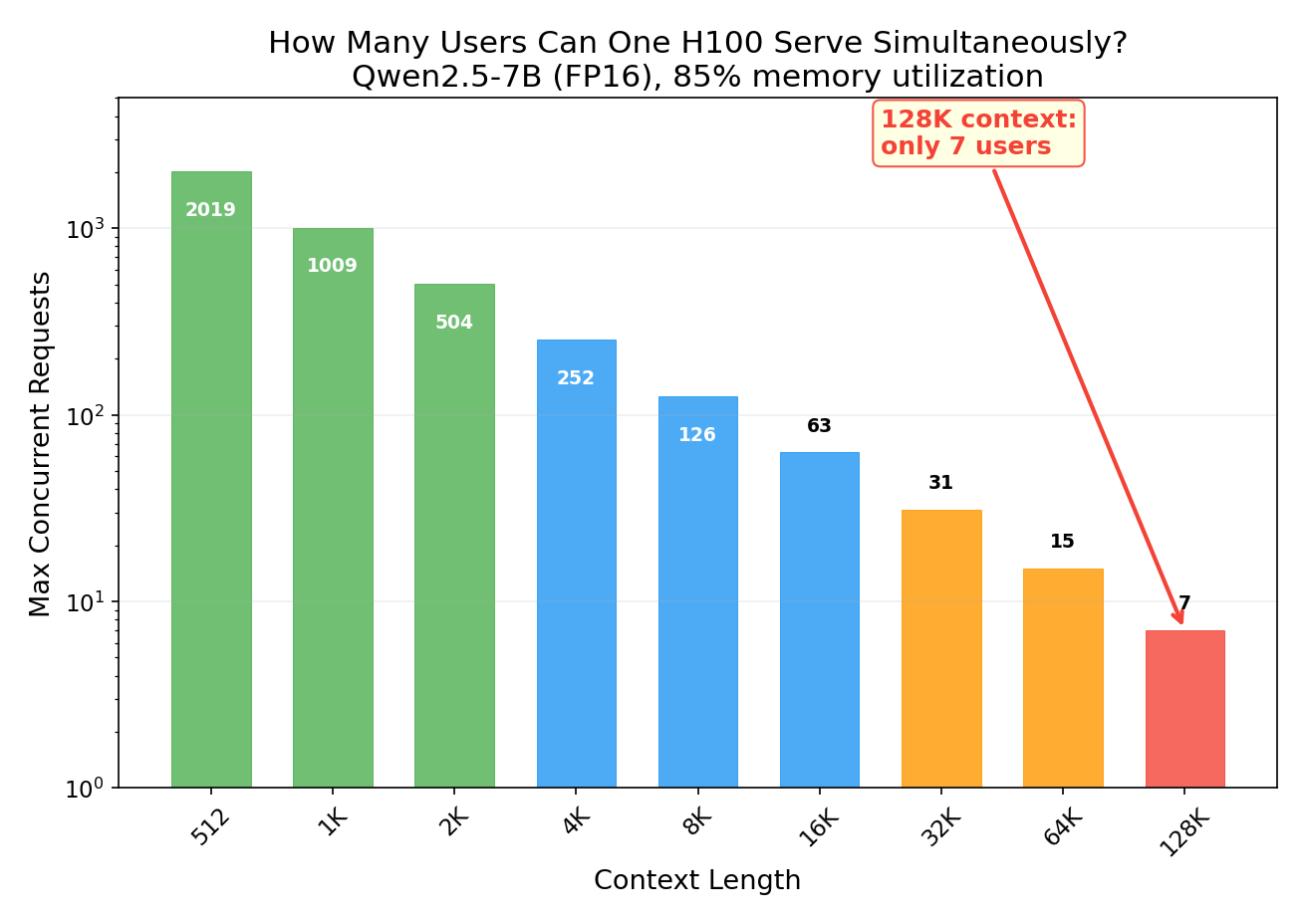
Given a fixed GPU and model, how many concurrent requests can you handle at different context lengths?
| Context Length | Max Concurrent Requests |
|---|---|
| 2K | 504 |
| 8K | 126 |
| 32K | 31 |
| 128K | 7 |
At 128K context, a single 80GB H100 serving Qwen2.5-7B can only handle 7 concurrent users. That’s it. The model weights take 14.2 GB (fixed), and each 128K request’s KV cache takes ~7 GB.
You might notice that 7 users × 7 GB = 49 GB of KV cache plus 14.2 GB of weights = 63.2 GB, leaving 16 GB free — enough for 2 more users in theory. So why stop at 7? Because the remaining headroom is needed for:
- Activation memory: each forward pass allocates transient buffers for intermediate computations (attention scores, MLP outputs). Even with FlashAttention, these are hundreds of MB; without it, the
(batch × heads × seq_len × seq_len)attention matrix alone can consume gigabytes. - CUDA fragmentation: PyTorch’s memory allocator can’t always reuse freed blocks perfectly, leaving unusable gaps between allocations.
- Framework overhead: CUDA context, cuBLAS workspaces, and kernel launch buffers consume a fixed ~1-2 GB.
In practice, running above ~85-90% GPU memory utilization leads to OOM crashes during forward-pass peaks. Production serving engines like vLLM manage this with PagedAttention, which reduces fragmentation, but even they don’t fill memory to 100%.
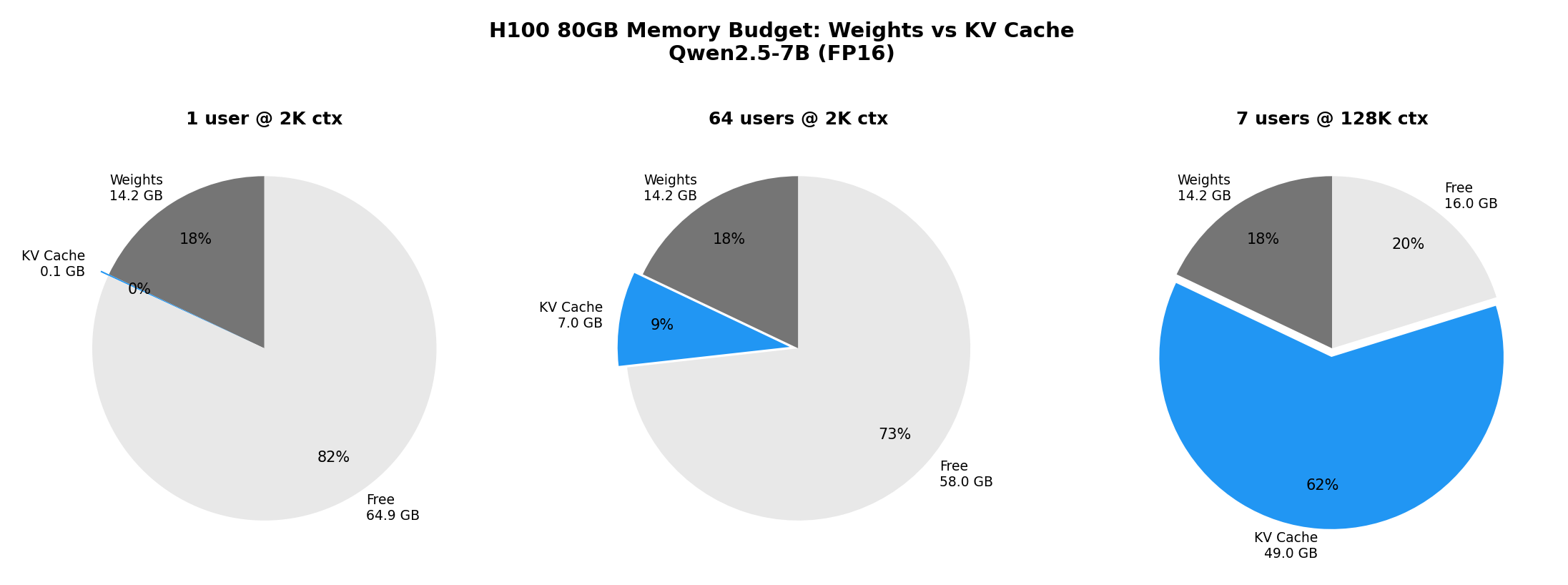
The pie charts above tell the story:
- Single user at 2K: KV cache is negligible (0.1% of GPU)
- 64 users at 2K: KV cache is 9% of GPU — still manageable
- 7 users at 128K: KV cache consumes 62% of the entire GPU
This is exactly why techniques like PagedAttention (vLLM), KV cache compression, and KV cache offloading exist — they’re all trying to squeeze more users into the same GPU memory budget.
Experiment 4: Why GQA Exists — It’s All About the KV Cache
Modern models use Grouped Query Attention (GQA) instead of standard Multi-Head Attention (MHA). In MHA, every attention head has its own Key and Value projections. In GQA, multiple query heads share the same K/V heads. This doesn’t affect compute or model quality — it purely reduces KV cache size.
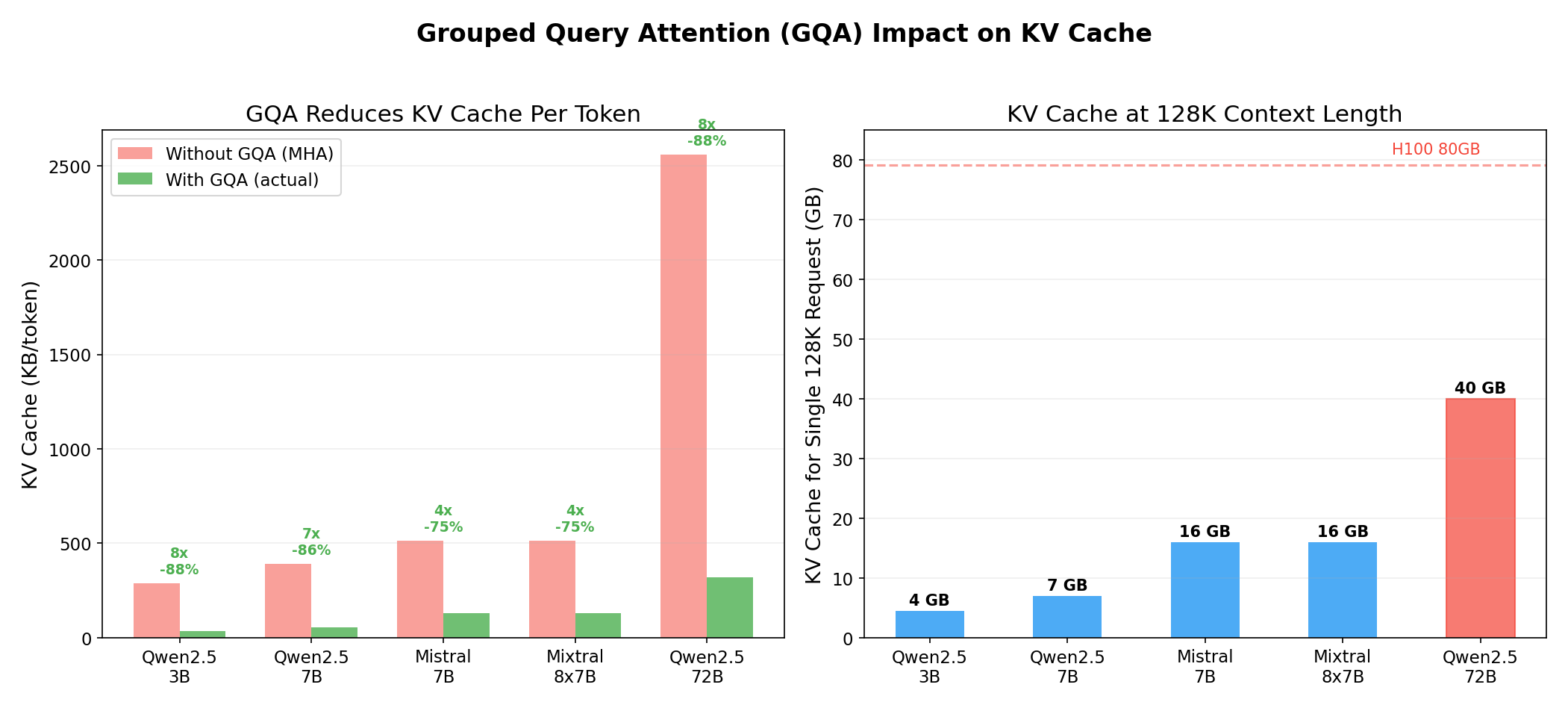
| Model | Attn Heads | KV Heads | GQA Ratio | KV KB/token | KV @ 128K | Savings |
|---|---|---|---|---|---|---|
| Qwen2.5-7B | 28 | 4 | 7x | 56 | 7 GB | 86% |
| Mistral 7B | 32 | 8 | 4x | 128 | 16 GB | 75% |
| Qwen2.5-72B | 64 | 8 | 8x | 320 | 40 GB | 88% |
Qwen2.5-7B is particularly aggressive with GQA — only 4 KV heads for 28 attention heads (7x ratio). This means its KV cache is 86% smaller than it would be with standard MHA. Without GQA, the 128K context budget would be 7x larger, and that single H100 could only serve 1 user at 128K instead of 7.
For the 72B model, the 128K KV cache is 40 GB for a single request — half the H100. Without GQA, it would be 320 GB per request, requiring 4 H100s just for one user’s cache! GQA is not an optional optimization — it’s a prerequisite for practical long-context inference.
Experiment 5: Prefill vs Decode — Two Very Different Bottlenecks
LLM inference has two distinct phases:
-
Prefill: Process the entire input prompt in one forward pass, computing KV for all input tokens. This is compute-bound — the GPU is doing massive matrix multiplications.
-
Decode: Generate tokens one at a time, appending one KV entry per step. This is memory-bandwidth-bound — each step reads the entire model’s weights but only computes one token.
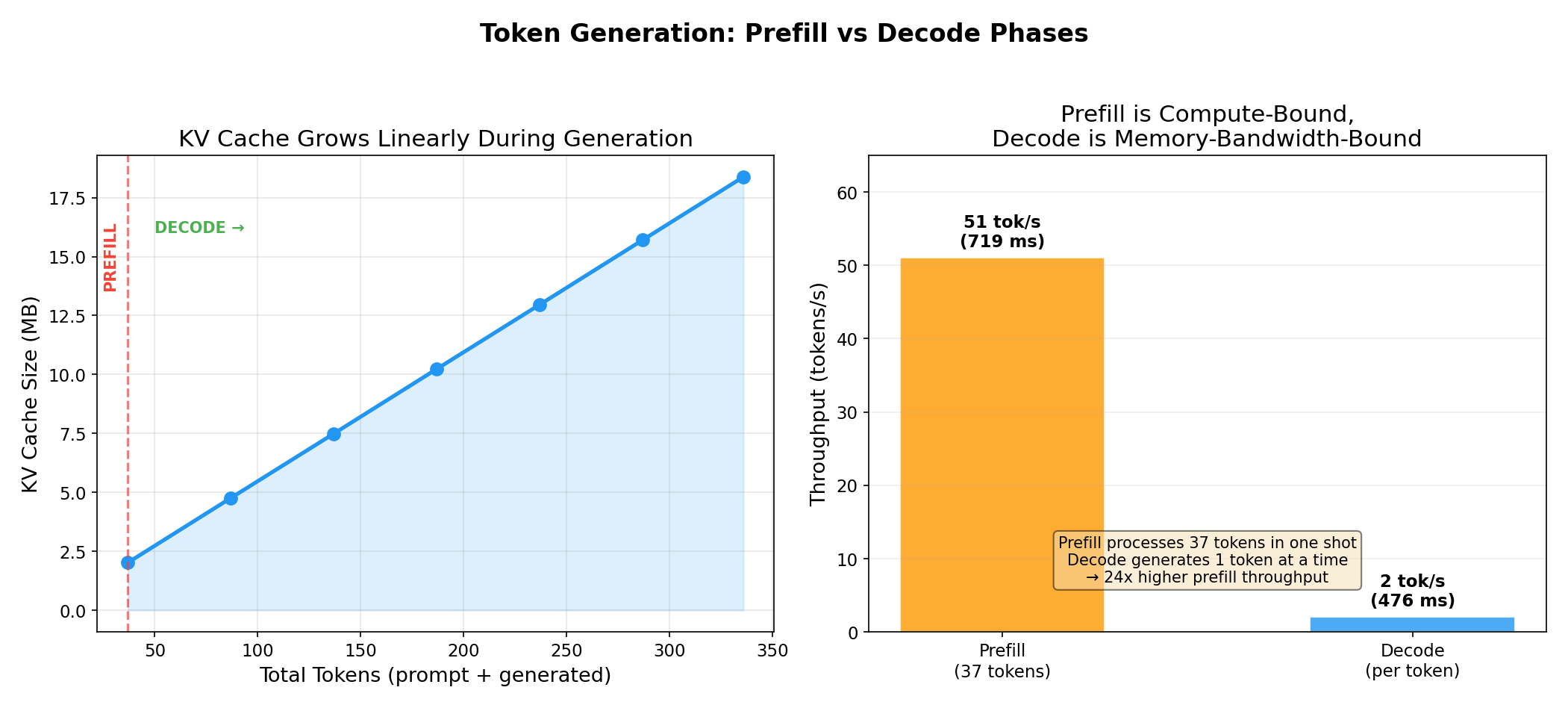
| Phase | Time | Throughput | Bottleneck |
|---|---|---|---|
| Prefill (37 tokens) | 719 ms | 51 tok/s | Compute |
| Decode (per token) | 476 ms | 2 tok/s | Memory bandwidth |
Prefill processes tokens at 24x higher throughput than decode. Each decode step takes almost as long as prefilling 37 tokens because the decode step still needs to load all 14.2 GB of model weights from HBM to compute — for just a single output token. This is the arithmetic intensity problem: decode has a very low compute-to-memory ratio.
The KV cache is what makes decode tolerable at all. Without it, each generated token would require re-processing the entire prompt from scratch (quadratic cost). With the KV cache, we only process one new token per step and look up the previous context from cached K/V tensors.
Note: The decode speed here (2 tok/s) is with raw HuggingFace
model.forward(). Production inference engines like vLLM or TensorRT-LLM achieve 50-200+ tok/s through continuous batching, CUDA graphs, and fused kernels.
The Bigger Picture: Why This Matters
Understanding KV cache is essential for:
-
Capacity planning: How many GPUs do you need to serve N users at context length C? The answer is dominated by KV cache, not model weights.
-
Choosing models: A model with aggressive GQA (Qwen2.5-7B: 7x ratio) can serve 7x more concurrent users than one with MHA, all else equal.
-
Understanding inference frameworks: PagedAttention (vLLM), KV cache compression, prefix caching, KV cache offloading — these all attack the same problem: making KV cache memory usage more efficient.
-
Disaggregated inference: NVIDIA Dynamo separates prefill (compute-bound) and decode (memory-bound) onto different GPU pools, and routes requests to workers that already have the KV cache — avoiding redundant prefill entirely.
Key Takeaways
- KV cache per token =
2 × layers × kv_heads × head_dim × dtype_bytes. It’s deterministic and perfectly linear. - KV cache dominates GPU memory at long contexts or high concurrency — often exceeding model weights.
- GQA reduces KV cache by
num_attn_heads / num_kv_heads— Qwen2.5-7B achieves 86% reduction with 7x GQA. - An 80GB H100 serving a 7B model at 128K context can only handle 7 concurrent requests.
- Prefill is compute-bound, decode is memory-bound — they benefit from fundamentally different optimizations.
- All KV cache experiments run on a single GPU — no multi-node setup needed to learn these concepts.
Reproduce This
All experiment scripts are available in the kv_cache_experiments directory. You only need a single GPU (any NVIDIA GPU with ≥24GB VRAM works for the 7B model):
docker run --gpus all --privileged -it --rm \
  -v $(pwd)/kv_cache_experiments:/workspace/kv_exp \
  nvcr.io/nvidia/pytorch:24.12-py3 bash

pip install transformers==4.47.1 accelerate
python /workspace/kv_exp/exp1_size_vs_seqlen.py
python /workspace/kv_exp/exp2_batch_scaling.py
python /workspace/kv_exp/exp3_memory_budget.py
python /workspace/kv_exp/exp4_gqa_comparison.py
python /workspace/kv_exp/exp5_token_by_token.py
Experiments run on Azure ND H100 v5 (Standard_ND96isr_H100_v5) with Qwen2.5-7B in FP16. All measurements are from actual GPU runs, not estimates.
This is a personal blog. Opinions and recommendations are my own, not Microsoft’s.
Leave a Comment